A notice to Meta advertisers says Facebook and Instagram ads will change how they behave from 28 October. When someone taps an existing ad, they may see product details and suggestions inside the app before they reach your website.
Here is the important part first. Meta has not confirmed this publicly. The notice was shared on LinkedIn around 14 October and reported by PPC Land the next day. As of 15 October, PPC Land found no Meta Help Center page, changelog note or newsroom post on it. We found none either when we checked again on 23 October.
So treat this as reported, not settled. But the check is quick, and the date is close. If it does happen, a default will change where your ad clicks go. That should be your decision, not the platform's.
What the notice says
According to the notice, as PPC Land reproduced it:
“When people tap your ad, they may see an experience on Facebook or Instagram with product info and personalized suggestions.”
The notice calls this “product browsing”. It says it will be added to existing ads from 28 October 2026.
It gives two ways to opt out:
- An “Opt out” button in the notice itself, to be used before 28 October.
- A per-ad switch. The notice says you can “turn product browsing on or off anytime in your Advantage+ Creative and Destination settings.”
The notice leaves gaps. It does not say which ad formats, placements or objectives are affected. It does not say whether the button covers one ad account or every account you manage. And it does not say what happens to people who tap through from the in-app experience to your site.
How to read the “3% more conversions” claim
The notice says that “on average, businesses saw 3% more conversions” with product browsing. It cites a test from 6 to 21 August 2026, across about 117,700 advertisers in at least three verticals, including e-commerce, consumer goods and retail, at more than 99% confidence.
That may be true. It is still a vendor claim about the vendor's own feature, with no published method. Three questions are unanswered:
- What counts as a conversion? The notice does not define it. A purchase, a lead and an “add to cart” are very different things.
- Who measured it? Meta did, and the notice does not say how. It was not your CRM or your till.
- An average across whom? An average across 117,700 advertisers can hide many businesses that did worse.
A 3% average lift tells you nothing about your account. We cover the wider problem in platform ROAS vs incremental ROAS: the platform marking its own homework is not the same as proof of extra sales.
Who should care
Product browsing sounds built for online shops with a product catalogue. For some of them, an extra step inside the app may help. For others, it adds friction or hides the journey from their own analytics.
You should check your settings if any of these apply:
- Your website does the selling. You rely on a bundle offer, a size guide, a delivery promise or a checkout flow that the app cannot show.
- You take quotes or bookings. Your ad exists to get someone onto a quote form or a booking calendar. Any step before that page is a step where people can drop off.
- You judge Meta by your own numbers. If you compare Meta clicks with GA4 sessions, CRM leads or Shopify orders, a new in-app step can change those numbers. You need to know why they moved.
- Nobody owns the Meta account day to day. This is the big one. If the person who set up the ads has moved on, nobody will see the notice.
The notice does not say whether lead-gen ads without a catalogue are affected. We do not know yet. Check anyway, because the cost of checking is small.
If you already suspect your ad spend is leaking somewhere you cannot see, our wasted spend analysis looks at exactly that.
How to check before 28 October
You need access to the Meta ad account that can change ad settings. You do not need a developer.
Step 1. Find the notice.
PPC Land does not say whether it arrived in Ads Manager or by email, so check both. If you manage more than one ad account, check each one. The notice does not say whether one opt-out covers them all.
Step 2. Decide: opt out, keep it, or split.
There are three sensible options:
- Opt out if your website step matters more than browsing in the app. This keeps your current journey while Meta's position is unclear.
- Keep it if you sell from a catalogue and want to try it. Go in knowing the 3% figure is unproven for you.
- Split if you have the volume. The notice says the switch is per ad. In principle, you could leave it on for some ads and off for comparable ones, then compare results in your own data. This only works with enough conversions to see a real difference.
Step 3. Write the decision down.
Note the date, the ad account, the option chosen and who made the change. If your numbers shift in November, this note tells you whether the setting is a suspect.
Step 4. Check the ad settings after 28 October.
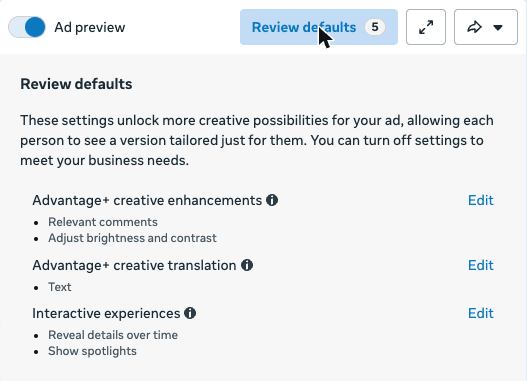
According to the notice, the per-ad switch sits in the Advantage+ Creative and Destination settings. Meta has not published a help page with the exact path. Here is what we saw in our own Ads Manager on 19 October. Open an ad and click Edit. Above the ad preview, a “Review defaults” button lists the settings Meta has switched on by default for that ad. Lower down, an “Ad experiences” section holds “Interactive experiences”. Product browsing was not listed yet. After 28 October, check both places on a few live ads. Do this again if you duplicate ads or launch new ones.
Step 5. Watch your own numbers.
Before 28 October, note your current Meta link clicks and the sessions GA4 records from Meta. After that date, compare them each week. A widening gap between clicks and site visits is worth a closer look. On its own, it does not prove product browsing caused it.
The wider lesson: defaults are decisions
This is not just a Meta problem. Meta's own Advantage+ creative page says: “Some enhancements may be turned on by default, but you can turn them off at any time.” Google also changes what its reports show without asking. We covered one recent example in our post on the Google Ads Overview page and GA4 conversions.
It is already happening on lead-gen ads. When we checked one of our own ads on 19 October, “Review defaults” showed five settings on by default. One, “Show spotlights”, shows our website form “in a spotlight after a few seconds”. Meta lists it as a default, not a choice we made.
Each default may be reasonable on its own. The risk is that nobody chose it. Over a year, a handful of unchosen defaults can change who sees your ads, where clicks land and what your reports count. Cutting wasted spend starts with knowing which settings someone actually decided.
If you run both platforms and want to know where each one fits, our Google Ads vs Facebook Ads comparison covers the basics. If you want someone to own your Meta account properly, see our Meta ads management service.
Not sure what your ad accounts are really doing?
Our free Wasted Spend + Tracking Confidence Check looks at where your budget goes and whether your tracking is strong enough to trust the numbers. When we manage accounts, we charge a flat fee, never a percentage of your spend, so we have no reason to tell you to spend more.
FAQ
Has Meta confirmed that product browsing turns on from 28 October?
Not publicly, as of 23 October 2026. The details come from an advertiser notice reported by PPC Land. Meta has not published a Help Center page, changelog note or newsroom post on it.
How do I turn off product browsing in Meta ads?
According to the notice, use the “Opt out” button in the notice before 28 October. After that, the notice says you can switch it on or off per ad in the Advantage+ Creative and Destination settings.
Does product browsing really increase conversions by 3%?
That is Meta's claim, based on its own August test. The notice does not define a conversion or explain the method. Treat it as untested for your account until your own data says otherwise.
Does this affect lead-gen or service businesses?
The notice does not say which ads qualify. The test it cites names e-commerce, consumer goods and retail, not lead generation. If your ads send people to a quote form or booking page, check your settings anyway.
Sources
- PPC Land, Meta will turn on product browsing in existing ads on October 28 (15 October 2026)
- PPC Land, Google's Universal Cart reaches US shoppers as Meta flips browsing on (16 October 2026)
- Relevant Audience, Meta product browsing turns on 28 Oct: how to opt out (16 October 2026)
- Meta for Business, Meta Advantage+ creative