Google Local Services Ads: The Complete Guide for 2026
Everything you need to know about Google Local Services Ads — setup, verification, ranking factors, optimization, costs, lead management, and a 90-day launch plan. The most comprehensive LSA guide online.
Google Ads Specialists · 15+ Years
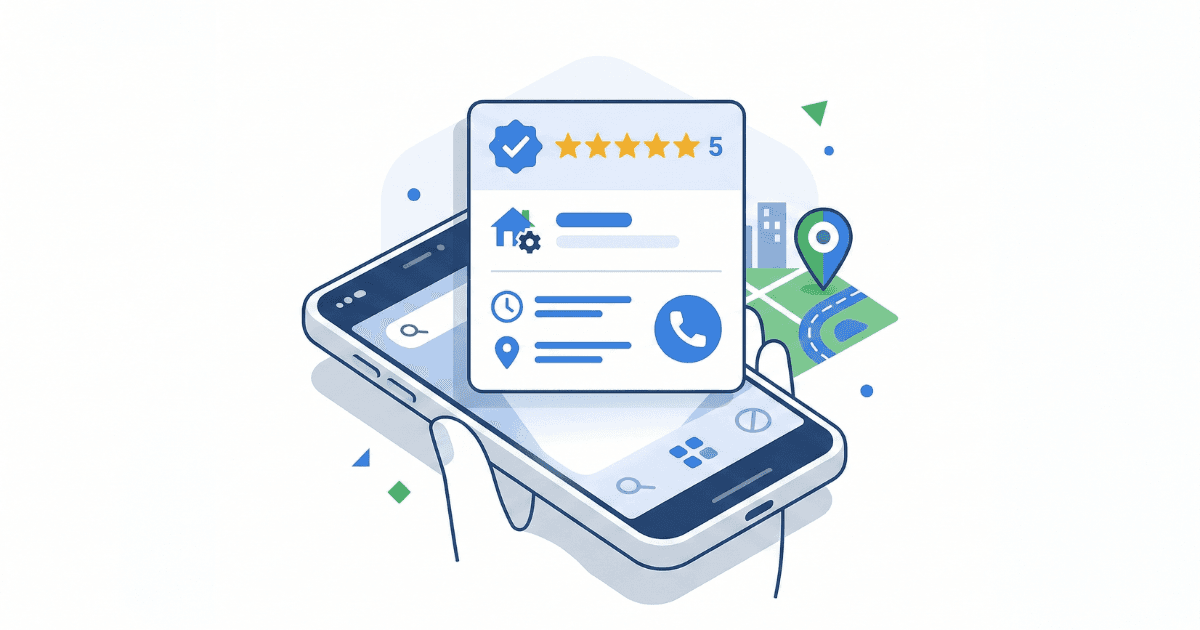
Google Local Services Ads (LSAs) sit at the very top of Google Search results — above paid search ads, above the Maps pack, above organic listings. When someone searches "plumber near me" or "divorce attorney in Dallas," LSAs are the first thing they see.
Unlike traditional Google Ads where you pay every time someone clicks, LSAs charge you only when a potential customer actually contacts your business — by phone call, message, or booking. That pay-per-lead model, combined with a Google Verified trust badge and prime SERP placement, is why LSAs have become the most efficient lead channel for local service businesses.
You don't pay for impressions. You don't pay for clicks. You pay when a real person picks up the phone or sends a message asking for your service.
LSAs launched in 2015 for a handful of home service categories. By 2024, Google expanded eligibility to over 100 business types — from HVAC contractors to attorneys to dentists to yoga studios. In October 2025, Google consolidated all trust badges into a single "Google Verified" checkmark. And in 2026, LSAs are increasingly appearing in AI Overviews, voice search results, and the local map pack.
This guide covers everything: how LSAs work mechanically, how to get verified, how to set up your account, how the ranking algorithm actually works, how to optimize for more leads at lower cost, how to handle the new automated credit system, industry-specific playbooks, and a 90-day launch plan you can follow step by step.
Whether you're a business owner considering LSAs for the first time, a marketer managing client LSA accounts, or someone already running LSAs who wants better results — this is the guide.
How Local Services Ads Work
The Pay-Per-Lead Model
When a customer contacts you through your LSA — by calling, sending a message, or booking an appointment — that's a lead. You're charged a flat fee for each valid lead. The cost per lead typically ranges from $15 to $100+, depending on your industry, location, and lead type. Message leads generally cost less than phone leads.
You set a weekly budget, and Google calculates a monthly maximum you'll never exceed. In some weeks you may spend less than your target, in others you may go slightly over — but the monthly ceiling holds.
What Customers See
Your LSA displays your business name, Google Verified badge, star rating, total review count, years in business, business hours, and service area. Below that, customers see action buttons: call, message, or book. On mobile, the top three results dominate the screen. A "More businesses" link expands to show additional providers below the fold.
Lead Types
- Phone calls — routed through a Google tracking number, recorded and transcribed by AI. This is the most common lead type and typically costs the most.
- Messages — text or email inquiries sent directly from the ad. Generally cheaper than phone leads.
- Bookings — direct appointment scheduling via Google's Reserve integration, which pulls your booking link from your Google Business Profile.
Google determines whether a lead is "valid" and chargeable using AI analysis. Spam calls, wrong numbers, and robocalls are filtered out and not charged.
Direct Business Search (Branded Queries)
An important detail most guides miss: when existing customers Google your business name and contact you through the LSA, you may still be charged for that lead. Your reporting dashboard separates "category search" (generic queries like "plumber near me") from "direct business search" (branded queries like your company name). Track both to understand your true cost per new customer.
Where LSAs Appear
- Google Search — top of the results page, above all PPC ads and organic results
- Google Maps — integrated into map-based local results
- Google Assistant & Voice Search — "Hey Google, find me a plumber" can surface LSA results
- AI Overviews — as of early 2026, local pack ads (including LSAs) appear on approximately 22% of tracked mobile keywords, up from under 3% in late 2025
LSAs vs. Google Ads vs. SEO vs. Other Platforms
LSAs vs. Google Search Ads (PPC)
The differences are fundamental. LSAs charge per lead, PPC charges per click. LSAs appear above PPC ads on the SERP. With LSAs, you have zero control over ad copy, keywords, or landing pages — Google generates everything from your profile. With PPC, you have granular control over every element. LSAs include a Google Verified trust badge; PPC ads have no equivalent built-in trust signal.
LSAs are best for capturing high-intent local leads — people who need a service right now. PPC is better for broader keyword targeting, remarketing, and driving traffic to your website. The smartest businesses run both: LSAs for "ready to buy" leads and PPC for everything else.
LSAs vs. SEO
SEO is free but slow — it takes months to build organic rankings. LSAs cost money but deliver leads within weeks of verification. They're complementary: strong organic rankings reduce your overall cost per acquisition, while LSAs fill the pipeline immediately. Businesses running LSAs, PPC, and SEO together dominate local search results across every placement on the page.
LSAs vs. Yelp, Angi, Thumbtack, HomeAdvisor
Third-party platforms generate leads from users browsing within their ecosystem. LSAs generate leads from Google Search — the highest-intent environment on the internet. LSA leads tend to be higher quality because the customer is actively searching for your specific service, not browsing a marketplace. Additionally, the reviews and reputation you build on Google are yours and work for your business beyond just LSAs, boosting your Maps and organic presence too.
That said, third-party platforms can still make sense for niche categories Google doesn't cover yet, or in geographic areas where LSA competition is exceptionally high.
Who Can Use Local Services Ads?
Available Countries
LSAs are available in the United States, Canada, United Kingdom, Australia, Austria, Belgium, France, Germany, Ireland, Italy, Spain, and an expanding list of countries. Availability varies by industry within each country — a category eligible in the US may not yet be available in the UK.
Eligible Industries (100+ Categories)
- Home services: plumbing, HVAC, electrical, roofing, painting, landscaping, pest control, garage door, locksmith, house cleaning, carpet cleaning, handyman, fencing, flooring, tree service, water damage restoration, foundation repair
- Legal: personal injury, family law, criminal defense, estate planning, immigration, bankruptcy, DUI, employment law
- Financial: accounting, tax preparation, financial planning, bookkeeping
- Real estate: agents, brokers, property managers
- Healthcare: dentists, optometrists, primary care physicians, chiropractors, veterinarians
- Learning: tutoring, preschools, driving schools, first aid training
- Care: child care, senior care, pet care, pet training
- Wellness: massage therapy, yoga studios, personal training, acupuncture
- Beauty: hair stylists, aestheticians, barbers, lash extensions, nail salons
- Automotive: mechanics, body shops, auto glass, towing
Google continues to expand eligible categories. If your industry isn't listed, check quarterly — new categories are added regularly.
The Verification & Screening Process
Before your ads can run, Google needs to verify your business is legitimate. The screening process is thorough — and that's actually an advantage, because it filters out unqualified competitors and builds consumer trust in the platform.
Google Business Profile (Mandatory)
Since November 2024, a verified Google Business Profile (GBP) with accurate, up-to-date information is mandatory for all LSA advertisers. Your GBP name, address, phone number, and service area must match your LSA profile exactly. Mismatches cause ranking drops and can trigger suspensions.
Business Registration
Google verifies your business is legally registered. Sole proprietors, LLCs, and corporations are all eligible. In select US verification flows, you may need a D-U-N-S number from Dun & Bradstreet — register for one in advance if you don't have it.
License Verification
State and provincial licenses are verified directly by Google. City and county-level licenses are self-attested. Requirements vary by trade and location — an electrician needs a state license, while a house cleaner may not need any. Check your specific category requirements on Google's verification dashboard.
Insurance Verification
Most categories require general liability insurance. Professional services may need professional liability or E&O coverage. Minimum coverage varies — $200K+ general aggregate is typical, though some trades require more. Your insurance document must be active and valid for at least 14 days after submission. The business name on your insurance must match your LSA account, or you'll need to provide DBA documentation.
Background Checks
Conducted through Pinkerton at no cost to you. Background checks cover the business owner, the business entity itself, and all field workers who visit customer locations (employees, contractors, subcontractors). Checks include identity verification, criminal history, sex offender registry, terrorist and sanctions registry, and civil litigation history for the business. Plan for 2–4 weeks for standard verification. Google may re-verify periodically.
Advanced Verification (Restricted Industries)
Locksmiths, garage door services, and other high-fraud-risk categories require Advanced Verification: a recorded 15–30 minute video interview with Google, conducted at your business location. You'll show official documents on camera and answer questions about your operations. Timeline is 6–8 weeks, and re-verification is required every 12 months.
The Google Verified Badge
As of October 2025, Google consolidated "Google Guaranteed," "Google Screened," and "License Verified" into a single "Google Verified" blue checkmark — confirmed as the only trust badge through 2026.
The money-back guarantee previously associated with the Google Guaranteed badge was discontinued in December 2025. The Google Verified badge now signals that your business has passed Google's screening process — background checks, license verification, and insurance confirmation. To keep the badge visible, you must renew expiring licenses and insurance each calendar year.
Google Business Profile Integration
Your Google Business Profile is the foundation of your LSA. Get this wrong, and everything downstream breaks.
Why GBP Is the Foundation
Your GBP feeds data into your LSA profile — business name, address, phone number, hours, reviews, and booking links. Some fields are synced automatically from GBP and can't be edited directly in the LSA interface. Others (budget, bidding, ad schedule) are LSA-specific. Understanding which is which prevents confusion during setup and management.
The Mismatch Problem
If your GBP name, address, phone number, or service area doesn't match your LSA profile, you'll see ranking drops, ad disapprovals, or outright suspension. This is the single most common source of LSA problems we see. Audit both profiles quarterly for NAP consistency, service categories, business hours, and service area boundaries.
Ownership & Access
Google verifies that the LSA account holder has legitimate ownership or manager access to the associated GBP. If you're an agency managing a client's LSA, ensure proper access is configured on both the GBP and the Google Ads account before starting the LSA setup.
As of July 2025, LSA customer reviews are fully managed through Google Business Profile rather than through the LSA account directly. This means your review response workflow, review solicitation strategy, and reputation management all happen in one place.
Setting Up Your LSA Account
Step 1: Check Eligibility
Go to Google's Local Services Ads page and enter your country, zip code, and business category. If your area or industry isn't eligible, you can try a neighboring metro area or check back quarterly as Google expands coverage.
Step 2: Create Your Profile
Enter your business name, phone number, and address. Select your service categories — be selective and only list services you genuinely offer, because you pay for every lead regardless of category. Set your service area (Google recommends targeting by city or town over zip code). Define your business hours — extended hours give you a ranking advantage. Write a compelling business bio. Enable messaging and booking toggles to open additional lead channels.
Step 3: Submit Verification Documents
Upload all licenses, insurance certificates, and initiate background checks. Have all documents ready before starting — names must match exactly across every document and your LSA account. Expect 2–6 weeks for verification depending on whether you need standard or advanced verification.
Step 4: Set Your Budget
Your weekly budget is your target spend. Google calculates a monthly maximum from this that you'll never exceed. Google recommends budgeting for at least 20 leads per week when starting. Start conservative and scale based on lead quality data. Important: LSA billing is linked to your Google Ads account — card failures or billing flags there will pause your LSA ads.
Step 5: Choose Your Bidding Strategy
- Maximize Leads (recommended): Google sets bids automatically to get the most leads for your budget. Best for new accounts.
- Target Cost-Per-Lead (tCPL): You set your desired average CPL, and Google adjusts bids around that target. Best once you know your ideal CPL.
- Max Per Lead: Sets a hard ceiling on what you'll pay per individual lead. Less volume but maximum cost predictability.
Whichever strategy you choose, expect a 2–4 week learning period before results stabilize.
Step 6: Set Your Ad Schedule
Choose the days and times your ads run. Align this with when you can actually answer the phone — running ads when nobody picks up will tank your ranking. Outside scheduled hours, a free (unpaid) version of your listing may still appear. You can pause ads anytime by setting them to "paused" or use "temporarily closed" to stop all leads entirely.
Step 7: Review & Go Live
Preview your ad, verify all information is correct, and launch. Your ads will begin appearing once verification is complete.
Photos Strategy
Photos directly impact both your ranking and your click-through rate. Google's own documentation confirms that profiles with high-quality images may rank higher and pay lower cost per lead. This deserves more attention than most businesses give it.
Photo Types
- Headshots (required for legal, real estate, finance): square aspect ratio, neutral background, head and shoulders only, looking directly at camera. Prepare 5 variations.
- Business photos: team shots, completed work (before/after), equipment, office or shop, branded vehicles
- Cover photo: minimum 1440x810px, 16:9 aspect ratio
- All other photos: minimum 640x640px
Technical Specs
Accepted formats: JPEG, PNG, TIFF, BMP, ICO, and WEBP. Maximum 10MB per image. Google reviews all photos before publishing.
What Gets Rejected
- Watermarks from another business
- Phone numbers, email addresses, or physical addresses in the image
- Blurry, out-of-focus, poorly lit, or screenshot-derived images
- Stock photos or images unrelated to your business
- Content violating client privacy (especially legal and healthcare)
Aim for 15–20 high-quality photos. For home services, before/after project shots are the strongest converter. For professional services, invest in professional headshots — they're displayed prominently in the ad unit.
How LSA Rankings Work
It's an Auction, But Not Like PPC
LSA ranking is auction-based: bid + lead likelihood + profile quality. Unlike PPC where the highest bidder often wins, LSAs heavily weight trust signals — reviews, responsiveness, and proximity.
Google also considers "diversity" — they may rotate providers so one business doesn't monopolize results. This means even newer businesses can get visibility if their profile quality is strong.
The 7 Ranking Factors
1. Reviews & Ratings — the single most influential factor. Google weighs quantity, recency, quality (star rating), and whether you respond to reviews. A business with 150 reviews at 4.8 stars typically outranks one with 30 reviews at 5.0. New reviews matter more than old ones — review velocity is critical. The unofficial benchmark for competitive markets: 4.8+ stars.
2. Responsiveness — Google tracks your answer rate, response time, and missed calls. Aim to answer calls within 30 seconds and messages within 4 hours. If you have 2+ message leads in 90 days, your estimated response time may appear on your ad. Missed calls actively hurt your ranking.
3. Proximity — Google heavily favors businesses closer to the searcher. A closer business with fewer reviews can outrank a farther one with more. Don't target service areas you can't serve quickly.
4. Profile Completeness & Quality — high-quality photos, complete bio, all verification checks passed. Higher quality profiles may also pay lower cost per lead.
5. Relevance — how well your listed services match the customer's search query. Be specific in your service categories and job types.
6. Business Hours — extended or 24/7 hours give a ranking advantage. Google interprets broader availability as better customer service.
7. Bid Amount — still a factor in the auction, but weighted less than in traditional PPC. A $30 bid with 4.9 stars and fast response will beat a $50 bid with 4.2 stars and slow answers.
The AI Layer
Google AI transcribes and analyzes every phone call routed through LSAs. It evaluates whether you answered, whether you were helpful, whether you closed the lead, and whether you were the right fit for the customer's needs. This behavioral data feeds directly into ranking decisions. Phone etiquette and sales skill are now indirect ranking factors.
Optimization Strategies
Review Strategy
Ask every satisfied customer for a review — at the point of service, in a follow-up email, or via SMS. Respond to every review, positive and negative. Aim for consistent review velocity: new reviews every week, not sporadic bursts. Never buy, incentivize, or fake reviews — Google will suspend your account.
Response Time
Use a dedicated phone line or answering service for LSA calls. Enable message leads and respond immediately. Consider after-hours answering services for 24/7 coverage. Google rewards real-time responsiveness — even seconds matter for your ranking.
Service Area & Job Type Refinement
Remove zip codes and cities where you can't respond quickly. Focus on dominating a smaller area rather than being spread thin. Google recommends targeting by city or town over zip code. Remove job types that generate low-quality leads — this is your primary lever for reducing waste since you can't control keywords directly.
Budget & Bidding
Start with Maximize Leads and let Google's algorithm learn for 2–4 weeks. Once you have CPL data, consider switching to Target CPL for more control. Scale budget up during high-demand seasons and down during slow periods. Monitor message leads vs. phone leads separately — they have different costs and close rates.
Profile Optimization
Upload 15–20 high-quality photos of real work. Write a compelling business bio with specific services and differentiators. Keep business hours accurate and as broad as realistically possible. Update your profile seasonally if your services or availability change.
Lead Quality Improvement
Rate every lead through the feedback system — this replaced manual disputes. Mark "dissatisfied" or "extremely dissatisfied" on bad leads to help Google's AI improve targeting. Track which service categories generate the best leads and pause underperformers. Respond to every lead, even ones you can't serve — Google tracks your response rate regardless.
Data, Privacy & Call Recording
Every phone lead through LSAs is routed through a Google tracking number. These calls are recorded and AI-transcribed. Google uses the transcripts to evaluate lead quality, your responsiveness, and how well you match the customer's needs. This is worth understanding for both operational and legal reasons.
Legal Considerations
In two-party consent states (California, Florida, Illinois, and others), both parties must consent to call recording. Google provides a pre-call disclosure, but you should understand your state's specific requirements and consult legal counsel if needed.
Sensitive Industries
- Healthcare: Be cautious discussing patient details on recorded LSA calls — HIPAA considerations apply
- Legal: Attorney-client privilege concerns exist on initial consultations conducted via recorded lines
- Financial: Sensitive financial information shared on recorded calls warrants care
Using Recordings to Your Advantage
Call recordings are available in your LSA dashboard. Use them for staff training, quality control, and understanding why leads aren't converting. Common findings: receptionists not asking for the appointment, long hold times, failure to qualify urgency. Since Google's AI evaluation of your calls affects your ranking, improving your phone game directly improves your ad performance.
Managing Leads & the Credit System
The Lead Dashboard
All leads appear in the Local Services tab within Google Ads (the dedicated LSA mobile app was discontinued in January 2025). Each lead shows customer name, contact info, service requested, and call recordings with AI transcripts for phone leads. Lead statuses: new, active, completed, archived.
The Automated Credit System
As of mid-2024, Google removed manual lead disputes entirely. Their AI now auto-assesses lead quality within 72 hours of the charge. Invalid leads — spam, wrong numbers, robocalls — are credited automatically within 30 days.
Critical change: "job type not serviced" and "geo not serviced" are no longer creditable reasons in many verticals and regions. This makes your job type and service area configuration even more important — get them wrong and you pay for irrelevant leads with no recourse.
Lead Feedback
The "Rate this lead" button replaced manual disputes. Options: Satisfied, Dissatisfied, or Extremely Dissatisfied. Your feedback trains Google's AI to send better leads over time. Rate every single lead — even good ones — to build a strong feedback loop. Consistent feedback is critical for long-term lead quality improvement.
Lead Quality Control
- Refine job types to reduce irrelevant leads at the source — this is your main quality lever
- Tighten service areas to reduce geographic mismatches
- Review call recordings to identify patterns in bad leads (common search terms, time of day)
- Track credit rate — if a high percentage of leads are being credited, something is misconfigured
Budget & Cost Deep Dive
Average Cost Per Lead by Industry
Costs vary significantly by industry, metro area, and competition density. Approximate ranges for 2026:
- House cleaning: $15–$45 per lead
- Landscaping: $20–$50
- Plumbing: $40–$75
- Electrical: $35–$70
- HVAC: $45–$85
- Roofing: $35–$100
- Locksmith: $20–$40
- Lawyers (PI): $75–$200+
- Dentists: $30–$60
- Real estate: $25–$50
Urban metros have higher CPLs than rural areas. Your review score and responsiveness directly affect your CPL — better profiles pay less.
Calculating ROI
Don't just track cost per lead — track cost per booked job, cost per acquisition, and lifetime customer value. The formula: (Revenue from LSA customers / Total LSA spend) = ROAS. A benchmark of 3x+ ROAS is healthy. For every $1 spent, you should see $3+ in revenue. LSAs typically convert at roughly 31% lead-to-customer versus 12% for traditional PPC — factor that into your calculations.
Benchmarks & KPI Targets
Here's what "good" looks like for LSA performance:
- Response rate: 80%+ (good), 90%+ (great), 95%+ (elite)
- Phone response time: under 60 seconds (good), under 30 seconds (great), under 15 seconds (elite)
- Message response time: under 4 hours (good), under 1 hour (great), under 15 minutes (elite)
- Lead-to-booked-job rate: 20%+ (good), 30%+ (great), 40%+ (elite)
- Review score: 4.5+ (good), 4.8+ (great), 4.9+ (elite)
- Review velocity: 2+/month (good), 4+/month (great), 8+/month (elite)
- ROAS: 3x (good), 5x (great), 8x+ (elite)
Industry-Specific Playbooks
Home Services (HVAC, Plumbing, Electrical, Roofing)
Emergency services dominate LSA searches — if you handle emergencies, enable 24/7 or extended hours. Train staff to qualify urgency immediately: "Is this an emergency or can we schedule?" Multi-trade businesses must submit separate LSA applications per trade. Photo strategy: before/after shots of completed work convert best. If you operate multiple service lines (e.g., HVAC and plumbing), each needs its own LSA profile.
Legal Professionals
Select practice areas carefully — you pay for every lead, including practice areas you don't want. If you're a personal injury firm that doesn't handle workers' compensation, leave it off. Professional headshots are displayed prominently. Higher CPLs are justified by higher case values. Be mindful that initial consultations via LSA are on recorded lines — attorney-client privilege considerations apply.
Healthcare & Dental
Patient trust is paramount — reviews carry extra weight. Booking integration is especially valuable for appointment-based services, reducing friction for the patient. Be extremely careful discussing patient details on recorded LSA calls given HIPAA obligations. Some healthcare advertising has additional compliance requirements beyond Google's standard policies.
Real Estate
Agents and brokers in the US and Canada cannot target by zip code (Google policy). Agent headshots are displayed prominently in the ad unit. Review strategy is critical — you compete primarily on trust and personality, not just location.
Beauty & Wellness
Your visual portfolio is your competitive edge — invest in professional photography of your work. Booking integration drives convenience-focused consumers who want to schedule instantly. Account for seasonal demand patterns: weddings in spring/summer, holidays in Q4.
Multi-Location & Enterprise Operations
Each location needs its own LSA account tied to a unique Google Business Profile. Use a Google Ads Manager Account for a bird's-eye view across all locations. Service areas must not overlap for the same categories between locations — this violates Google's guidelines. Each location needs independent verification: separate licenses, insurance, and background checks. Budgets and bidding strategies should be set per location based on local competition and demand. Review generation must happen per location, not centrally.
For large franchises, define clear access control and governance: who manages each account, what permissions they have, and how brand consistency is maintained. Bulk account creation may be possible through Google's partner program or the Ads API for enterprise-scale operations.
Why Your Ads Aren't Running
If your LSA ads suddenly stop showing, check these common causes in order:
- Budget exhausted: you've hit your monthly max — ads resume next billing cycle
- Billing issues: failed payment, expired card, or Google Ads account-level holds
- Expired documents: license or insurance lapsed — badge removed, ads paused automatically
- Policy violation: ad disapproved or account flagged — check Policy Manager in your dashboard
- Targeting too narrow: service area or job types set so tightly there's no search volume
- Ad schedule: outside your set business hours or ad schedule window
- Manually paused: you or someone on your team paused the ad
- GBP issues: unverified, suspended, or mismatched Google Business Profile
- Background check pending: ads won't run until all screenings clear
- Low demand: your service category in your area has low search volume at certain times
Diagnostic steps: check ad status in the LSA dashboard, review billing in Google Ads, verify all documents are current, confirm GBP matches LSA profile, check for policy notification emails, and test your phone number to make sure it rings and someone answers.
CRM Integration & Lead Automation
Google Ads API
The Google Ads API lets you pull LSA lead data directly into your CRM without CSV downloads. Supported actions include retrieving leads, updating lead status, setting budgets, and configuring bidding strategies. This requires developer resources or a platform that supports the integration natively.
Third-Party Integrations
- Home services: Housecall Pro, ServiceTitan, Jobber — native or near-native LSA integrations
- All-in-one CRM: HighLevel (GoHighLevel) — Reserve with Google integration for direct booking
- Legal: Clio — LSA integration built for law firm workflows
- Real estate: Lofty — leads flow directly into the CRM
- Universal: Zapier — connect LSA data to virtually any platform
Automation Best Practices
Auto-assign leads to the right team member based on service type. Trigger immediate follow-up SMS or email when a lead comes in. Track lead-to-job conversion in your CRM for accurate ROI calculation. Sync review requests with job completion for automated review generation — this closes the loop between lead acquisition and the review velocity that fuels future ranking.
Common Mistakes & Myths
- "LSA is set-and-forget" — it requires active management: lead feedback, review generation, profile updates, and ongoing job type refinement
- "Higher bid always wins" — false. Trust signals (reviews, responsiveness) outweigh bid in the LSA auction
- "All bad leads are creditable" — wrong. "Job type not serviced" and "geo not serviced" are no longer automatically credited in many verticals
- Listing services you don't offer — generates leads you pay for but can't serve
- Not answering the phone — kills your ranking faster than anything else
- Mismatched GBP and LSA profiles — causes suspensions and ranking drops
- Claiming 24/7 without an answering service — missed after-hours calls destroy your responsiveness score
- Ignoring reviews — especially failing to respond to negative ones
- Over-expanding service areas — being spread too thin hurts your proximity ranking
- Not rating leads — starves Google's AI of the feedback it needs to send you better leads
- Running only LSAs — best results come from LSAs + PPC + SEO working together
- Letting licenses or insurance expire — badge disappears and ads stop running immediately
- Not tracking actual ROI — measuring CPL without tracking revenue downstream is flying blind
Suspension, Policy Violations & Recovery
Common Suspension Triggers
- Misrepresenting your business (wrong address, fake reviews, deceptive information)
- Expired licenses or insurance
- Failed re-verification or background check issues
- Multiple LSA listings for the same business at the same location
- Google Ads account-level issues (billing flags, policy violations) cascading to LSA
How to Appeal
Google sends a notification email explaining the reason for suspension. Fix the underlying issue before submitting an appeal. Use the Contact Us link in your account notification to submit. Be thorough, honest, and specific. Only submit one appeal at a time — multiple simultaneous appeals may not be processed. Plan for 2–4 weeks for a response.
Prevention
Audit your profile quarterly for accuracy. Set calendar reminders for license and insurance renewal dates at least 30 days before expiration. Keep GBP and LSA profiles in sync at all times. Monitor Google Ads account health separately — billing issues there cascade to your LSA.
Reporting & Performance Metrics
Key Metrics to Track
- Lead volume — total leads by type (calls, messages, bookings)
- Cost per lead — broken out by lead type
- Cost per booked job — the metric that actually matters for profitability
- Booking rate — percentage of leads that become paying customers
- Response rate & time — how often and how quickly you respond
- ROAS — revenue generated vs. ad spend
- Review velocity — new reviews per week or month
- Credit rate — percentage of leads credited (high rate = configuration problem)
Built-In Reports
Access reports via the Reports tab in the LSA dashboard. Filter by category search vs. direct business search, lead type, and date range. A 2025 update separated message lead costs from phone call costs for clearer analysis. Call recordings and AI transcripts are available for every phone lead.
Attribution: From Lead to Revenue
Tag every LSA lead in your CRM with its source. Track the full funnel: lead → responded → booked → completed job → revenue collected. Calculate true cost per acquisition, not just cost per lead. Compare LSA attribution against PPC and organic to allocate your marketing budget intelligently.
The Future of Local Services Ads
AI-Powered Call Analysis
Google already transcribes and evaluates every LSA call. Expect behavioral scoring to become a larger ranking factor. Businesses with better phone etiquette and closing rates will be explicitly rewarded with better placements and potentially lower CPLs.
Local Pack Ad Expansion
Local pack ads surged from under 3% to 22% of tracked mobile keywords between November 2025 and January 2026. LSAs are expanding beyond the dedicated SERP placement into more map and local search surfaces.
Voice Search & AI Overview Integration
The Google Verified badge is expected to expand to more map and voice search surfaces. "Hey Google" queries already surface LSA results. As AI Overviews grow, LSA-verified businesses may receive preferential treatment in conversational search results.
Call-Only Ads Deprecation
Google is phasing out call-only ads: new creation blocked February 2026, fully sunset February 2027. LSAs are the natural migration path for call-focused local businesses. If you're currently relying on call-only ads, start setting up LSAs now.
Category Expansion
Over 100 categories are eligible now, with Google consistently adding more. If your industry isn't covered, check back quarterly.
Your 90-Day LSA Launch Plan
Weeks 1–2: Foundation
- Check eligibility for your industry and location
- Verify your Google Business Profile (or create one)
- Audit GBP for NAP accuracy, business hours, and service categories
- Gather all documentation: licenses, insurance certificate, owner ID
- Register a D-U-N-S number if you don't have one
- Collect and organize 15–20 high-quality business photos
Weeks 3–4: Setup & Verification
- Create your LSA account and complete the profile
- Submit all verification documents
- Initiate background checks for owner and field workers
- Set a conservative starting budget (aim for ~20 leads/week)
- Choose Maximize Leads bidding strategy
- Set ad schedule aligned with actual phone availability
- Enable messaging and booking
Weeks 5–8: Launch & Learn
- Ads go live after verification clears
- Answer every call within 30 seconds, every message within 1 hour
- Rate every lead in the feedback system
- Ask every completed-job customer for a Google review
- Track all leads in your CRM: lead → booked → completed → revenue
- Monitor CPL, response rate, booking rate, and review velocity
- Do not change bidding strategy yet — let the algorithm learn
Weeks 9–12: Optimize & Scale
- Analyze lead data: which job types convert best? Which areas?
- Remove low-performing job types and underperforming zip codes
- Consider switching to Target CPL or Max Per Lead based on data
- Scale budget up on high-performing segments
- Review call recordings for sales training opportunities
- Run your first ROAS calculation — is it 3x+?
- Set up quarterly audit: profile accuracy, document renewal dates, GBP sync
Ongoing
- Monthly: review lead quality, adjust job types and areas, check review velocity
- Quarterly: full profile audit, GBP sync check, document expiration review
- Annually: re-verify licenses and insurance, update photos, adjust strategy for market changes
Frequently Asked Questions
How much do Local Services Ads cost?
You pay per lead, not per click. Cost per lead ranges from $15 to $200+ depending on your industry and location. You set a weekly budget and never exceed a monthly maximum.
What's the difference between LSAs and Google Ads?
LSAs are pay-per-lead and appear above Google Ads on the search page. You don't write ad copy or choose keywords — Google generates everything from your profile. Google Ads (PPC) are pay-per-click with full control over keywords, ad copy, and landing pages.
Can I run LSAs and Google Ads at the same time?
Yes, and you should. LSAs capture high-intent "ready now" leads while Google Ads let you target broader keywords, run remarketing, and drive website traffic. Together they cover more of the search landscape.
How long does verification take?
Standard verification takes 2–4 weeks. Advanced verification (required for locksmiths, garage door services, and other restricted categories) takes 6–8 weeks.
What happens if I miss a call from an LSA lead?
Missed calls hurt your responsiveness score, which directly affects your ranking. You won't be charged for calls you don't answer, but consistently missing calls will push your ads lower in results.
Can I choose which keywords trigger my LSA?
No. Google matches your ad to searches based on your service categories and location. Your only control is which service categories and job types you list — choose them carefully.
Can I dispute bad leads?
Manual disputes were removed in 2024. Google now uses AI to automatically credit invalid leads within 30 days. You can rate leads as "dissatisfied" to train the algorithm, but you cannot dispute individual leads anymore.
Are LSA calls recorded?
Yes. All phone leads are routed through Google tracking numbers and are recorded and transcribed by AI. Recordings are available in your dashboard. Be aware of two-party consent laws in your state.
Why did my LSA ads stop running?
Common causes: budget exhausted, billing issues, expired licenses or insurance, policy violations, targeting too narrow, ad schedule outside business hours, or GBP problems. Check your dashboard status and billing first.
What's the difference between Google Guaranteed and Google Verified?
As of October 2025, Google consolidated Google Guaranteed, Google Screened, and License Verified into a single "Google Verified" badge. The money-back guarantee associated with Google Guaranteed was discontinued in December 2025. Google Verified confirms your business passed screening — background checks, licenses, and insurance.
LSA Glossary
- LSA — Local Services Ads
- CPL — Cost Per Lead: what you pay for each customer contact
- tCPL — Target Cost Per Lead: a bidding strategy where you set your desired average CPL
- GBP — Google Business Profile: the business listing that feeds your LSA data
- NAP — Name, Address, Phone Number: must be consistent across GBP and LSA
- Google Verified — the unified trust badge replacing Google Guaranteed and Google Screened (Oct 2025)
- Lead credit — automated refund for leads Google's AI determines were invalid
- Review velocity — the rate at which new reviews are received over time
- Maximize Leads — automated bidding strategy that optimizes for lead volume
- Direct business search — when someone searches your business name specifically (vs. a generic service search)
- Advanced verification — video interview required for restricted verticals (locksmiths, garage doors)
- D-U-N-S number — Dun & Bradstreet business identifier, sometimes required during US verification
- ROAS — Return On Ad Spend: revenue generated divided by ad spend
- Reserve with Google — booking integration connecting scheduling tools to your LSA
Get Expert Help With Your LSA Strategy
Local Services Ads are one of the most efficient lead channels available for local businesses in 2026. But getting the most out of them requires the right setup, ongoing optimization, and integration with your broader marketing strategy.
If you want help setting up, optimizing, or scaling your LSA campaigns — or integrating them with Google Ads and SEO for maximum coverage — we can help. We manage LSA campaigns across home services, legal, healthcare, and dozens of other industries.
- Get a Free Wasted Spend Analysis — see where your current ad budget is going wrong
- ROI Calculator — estimate your potential return from paid advertising
- Waste Calculator — find out how much of your budget is wasted on bad clicks
- Google Ads Cost Calculator — see CPC and budget benchmarks for your industry
- Our PPC Management Services — full-service Google Ads, LSA, and PPC management
Written by
PPC ChiefGoogle Ads specialists with 15+ years of experience and £20M+ in managed ad spend. Google Ads certified PPC management for UK and US businesses.
Free PPC Tools & Calculators
Estimate CPC and monthly budget for 28 industries
Compare CTR, CPC, and conversion rates by industry
ROI analysis and verdict for your industry
Calculate potential returns from your ad spend
Find out how much of your budget is wasted
500+ keywords to block wasted clicks
Related Articles
Site Kit Shows Sales and Leads. Check What Reaches Google Ads.
Site Goals can show WooCommerce sales and form leads without proving Google Ads received them. Trace events, conversion actions and campaign goals.
Black Friday Google Ads for UK SMEs: What to Fix in October, Before You Raise the Budget
Black Friday 2026 is 27 November. What UK SMEs should fix in Google Ads in October: tracking, targets, margin-based budgets, promotions and seasonality.
Google Ads Conversions Look Wrong Since June? Check Your Consent Setup (UK)
Since 15 June 2026, Consent Mode is the single control for Google Ads data from the Analytics tag. What changed, the UK rules, and a 7-point check.
Need Help With Your Google Ads?
Get a free Wasted Spend Analysis and see exactly where your ad budget is going wrong.